A CMS for People Who Don’t Want a CMS
I try to keep everything I build as simple as possible. It would be ridiculous to build this website using anything other than something like GitHub Pages or Vercel. It’s a simple, static Astro site with no JavaScript, barely any custom CSS, and two fonts. This does pose a problem though; how do you edit your website remotely with no access to a terminal?
You might suggest GitHub Mobile. Add a markdown file, commit, push, and a worker builds the site. This is what I was planning on doing. It isn’t exactly intuitive though, nor fun. The other option would be moving towards a content management system (CMS), like Wordpress, Ghost, or Grav. Perhaps one day I might want a full admin dashboard, with users, analytics and… PHP. (I probably won’t).
I stumbled upon Pages CMS – it integrates with your existing static site, whether it be Astro, Hugo, or your own hand-rolled SSG. All it needs is push access to your repository to give you media uploads, content management, and site configuration, while still allowing you to exploit Somecompany Pages for their free tier! Importantly, it’s entirely separate from your website, meaning there’s no changes to the content served to visitors. Really, Pages CMS is just a fancy interface over the top of a Git repo.
Show me!
Here’s an example. I refactored this website to read in my list of projects from a projects.json file. A project consists of a name, year, description, an optional URL, and a list of technologies. I added Pages CMS to my GitHub repo, gave it a .pages.yml file to tell it to write my projects to projects.json, and here we go:
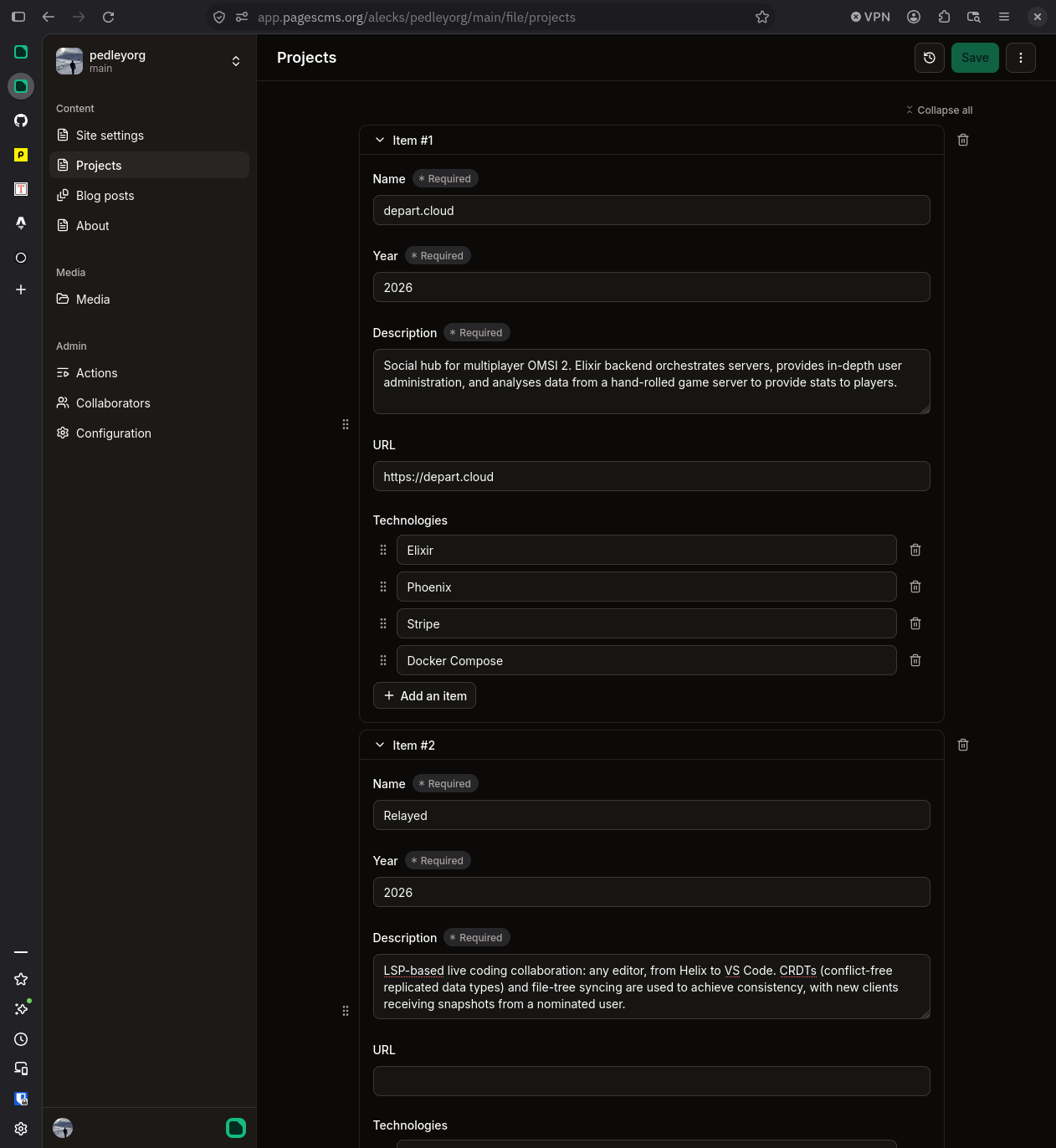
Now whenever I would like to add a project when I’m bored on the bus, I just have to open Pages CMS and edit the form. No need to write JSON (or worse, Astro) on an iPhone keyboard. Similarly, I’ve configured “Site settings” to edit page titles, SEO descriptions and social links following the same JSON pattern. Pages CMS handles it all for you, and even allows adding other collaborators (a perfect use-case I can imagine is quick documentation fixes).
The .pages.yml file
Everything you need to tell Pages CMS is done through .pages.yml. Here’s how I told it to write my projects to projects.json:
content:
  - name: projects
    label: Projects
    type: file
    path: src/data/projects.json
    format: json
    list: true
    fields:
      - name: name
        label: Name
        type: string
        required: true
      - name: year
        label: Year
        type: string
        required: true
      - name: description
        label: Description
        type: text
        required: true
      - name: href
        label: URL
        type: string
      - name: technologies
        label: Technologies
        type: string
        list: true
Simple as that. Then to render projects.json on the Astro site:
<ul class="projects">
	{projects.map((project) => (
		<li>
			<div class="project-heading">
				<h3>
					{project.href ? (
						<a href={project.href}>
							{project.name}
							<span class="project-arrow" aria-hidden="true">
								↗
							</span>
						</a>
					) : (
						project.name
					)}
				</h3>
				<span class="project-year">{project.year}</span>
			</div>
			{project.description && <p>{project.description}</p>}
			{project.technologies?.length ? (
				<p class="technologies">{project.technologies.join(", ")}</p>
			) : null}
		</li>
	))}
</ul>
The part I like about Pages CMS is that it integrates with your website, not the other way round. You don’t change your site much to make it happy.
What about blog posts and media?
This is the good bit. It can read your existing YAML frontmatter, making blogs a breeze. You get a fancy WYSIWYG editor too. For me, there was no refactoring or setup needed, other than editing my .pages.yml. Here’s a simplified example:
media:
  input: public/uploads
  output: /uploads
content:
  - name: blog
    label: Blog posts
    type: collection
    path: src/content/blog
    format: yaml-frontmatter
    filename: "{primary}.md"
    view:
      fields: [title, pubDate]
      primary: title
      sort: [pubDate, title]
      default:
        sort: pubDate
        order: desc
    fields:
      - name: title
        label: Title
        type: string
        required: true
      - name: pubDate
        label: Publication date
        type: date
        required: true
        options:
          format: yyyy-MM-dd
      - name: body
        label: Content
        type: rich-text
The rich-text type is what gives you a nice in-browser Markdown editor. The most useful part is our media block though – this is probably the main thing that makes writing blog posts much less miserable than doing it from GitHub mobile.
I can simply paste a screenshot into the Markdown editor, and it’ll push this to the ./public/uploads directory. Astro serves the contents of the public directory automatically, meaning no changes were needed on my side: Pages CMS adds an image tag pointing to /uploads/whatever.png, and that’s it. No need to think about managing media yourself, ensuring the filenames match up, and accidentally chucking a screenshot in the wrong directory or forgetting to commit it. Here’s the rich text editor in action:
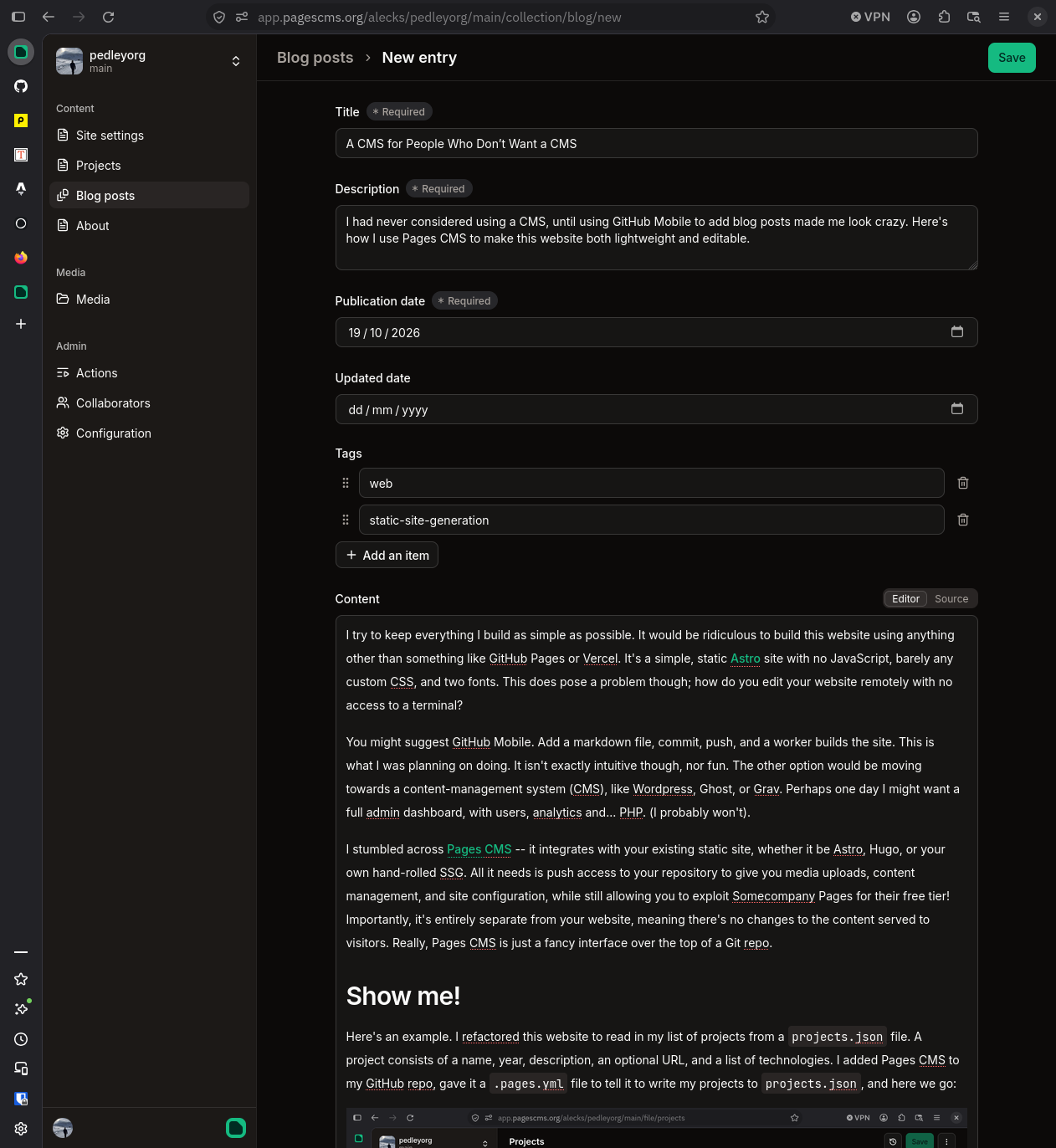
Image optimisation and more
Okay, so content management systems do a lot more than let you edit blog posts. Some of it could be considered ‘bloat’, but one thing is definitely worth it: image optimisation. This is something that can already be done with CI workflows, like GitHub Actions, but Pages CMS makes it a bit easier. You can add a button to your ‘Media’ tab to run the workflow for you, all confined in the one dashboard. This is a simple example, but you can do a lot more: think about a button to build a preview before you publish a new post, scheduling posts for publishing, generating shareable social images for new posts, etc.
Conclusion
This is the farthest I would go in adding any sort of content management to any static site. This website will work forever, as long as browsers still support HTML and CSS. If Pages CMS goes down, I can go back to the old-fashioned way of editing the files myself, or self-host it. There’s no thinking about updating Wordpress because of a CVE, no dealing with outdated plugins, and importantly, you choose exactly what is served to your visitors. UPDATE: Only took 2 days for that CVE… “Critical security issue affecting PHP”.
A sub-100-line config file is all you need to make it easy to manage uploads and content on your static site. It might not be necessary, but there’s almost no reason not to. It’ll make your life a lot easier if you ever feel like writing a blog post while on the move, which, if you’re like me, is one of the few places where you’ll have enough time to write one. It’s free and open-source, and if you don’t like it, just remove its push access to your repo – done.
If you want to test it out, or use this blog as a template for your own, the source code is licensed under the AGPL v3.0. Instructions are in the README.